Migrating data to SuccessFactors Employee Central from a legacy Human Capital Management (HCM) system is a crucial and critical activity and usually a difficult and time-consuming one. When you are migrating data to Employee Central from the SAP HCM module, it is important to understand what options are available, as well as the tools which will reduce the time, effort and complexity of the data migration activities.
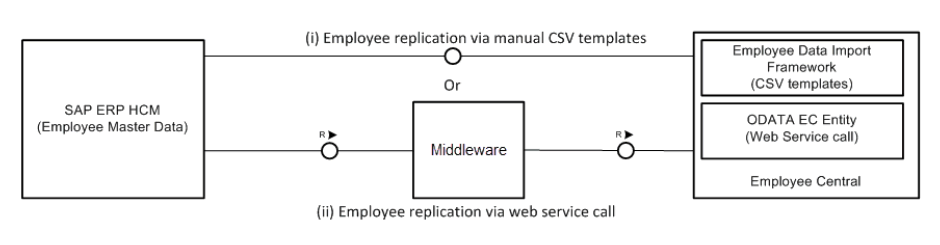
Data can be transferred from SAP ERP HCM to Employee Central using different communication channels.
- Using CSV-based template files and the manual import framework in Employee Central
- Using a synchronous Web service call and the middleware that is available for the data replication from SAP ERP HCM to Employee Central
In our experience there is always the need for the manual import framework in Employee Central, however we strive to offer the web-service based approach for the main bulk of Employee Data migration.
The tool offered for this purpose by SAP is Infoporter. It is deployed as part of the integration add-on for SAP ERP and SuccessFactors Employee Central.
A graphical overview of data between systems.

There are two main advantages to using Infoporter. It allows the accurate migration of historical data including multiple and concurrent hires and rehires. It creates the correct entries in the employee key mapping table so that when changes are replicated from Employee Central back to HCM in the future, no new personnel numbers/records are duplicated.
There are challenges associated with migrating historical data. Legacy data has to be mapped back to structures and data points in time, that may no longer be in use, to give a comprehensive picture of the development of your business over time. This can be a resource hungry and time consuming activity. The more history you need for trend reporting, pay cycles, legal regulations, etc. The more complicated things become. Infoporter is built to handle these complications, it has the ability to collect the portlet configuration of your SuccessFactors system and together with pick lists and value mappings helps you map these to the infotypes in your HCM system, enabling you to populate the correct portlets in the correct order and delivers a complete, viable Employee Central record. Once you have armed it with the correct foundation objects, picklists and value mappings, it stands ready to migrate large and small volumes with comprehensive error logging throughout. The correct load order for data objects is predetermined by Infoporter and any data that does not meet the validation criteria will be rejected and logged in SAP’s log application (SLG1).

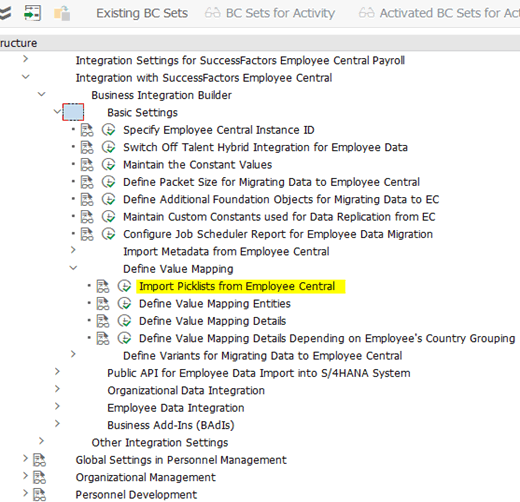
The tool can be found within the configuration menu of the Business Integration Builder in your HCM system and can be adapted here, not only to add picklists and value mappings but also to further transform data through programming in the BADI framework. The steps required are clearly laid out in their order of completion.